
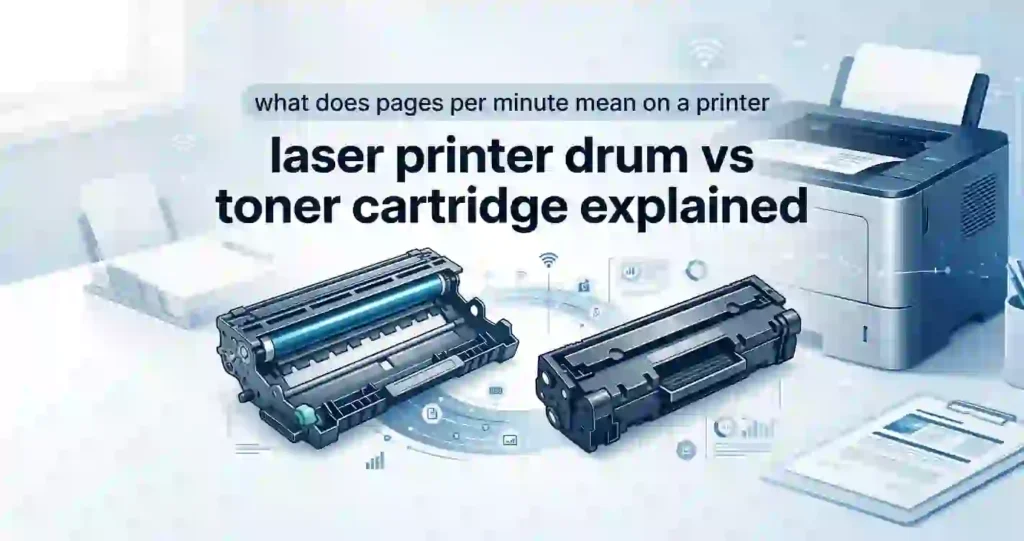
When your laser printer flashing an error light or spitting out streaky pages, figuring out whether to replace the toner cartridge or the drum unit can save you both money and frustration.
A toner cartridge is the supply container holding dry pigment powder, while a drum unit is an electrically charged cylinder that transfers that powder onto paper. Think of the toner cartridge as the ink pen and the drum unit as the stamp that presses the ink onto the page.
Laser Printer Drum vs Toner Cartridge: Quick Answer
- A toner cartridge is the removable component that stores and supplies dry powdered toner for printing.
- A drum unit (imaging drum) is a photosensitive roller that uses static electricity to transfer toner powder onto paper.
| Feature | Toner Cartridge | Drum Unit |
| Main Purpose | Supplies dry toner powder | Transfers toner image onto paper |
| Typical Replacement | Frequent (every 1,000–10,000 pages) | Infrequent (every 12,000–50,000 pages) |
| Primary Metric | Page yield at 5% coverage | Drum life / total page count |
| Common Symptom | Faded prints, low toner warnings | Repeating spots, lines, gray background |
| Typical Cost (USD) | $30 – $150 | $50 – $200 |
What Does a Toner Cartridge Do?
The toner cartridge contains a fine powder made of plastic polymer, iron oxide, and colorants. Inside the printer, internal rollers mix the powder to give it an electrostatic charge before supplying it to the drum.
Cartridges are sold in standard-yield and high-yield (XL) varieties. Standard options typically print 1,000 to 3,000 US Letter pages, whereas high-yield cartridges can deliver up to 10,000+ pages before needing replacement.
What Does a Laser Printer Drum Do?
The drum unit features an electrophotographic, photosensitive surface. A laser beam draws your document onto this spinning cylinder using static charges, attracting toner powder only to the image areas.
Some manufacturers (like Brother) design printers with a separate drum and toner, requiring individual replacements. Brands like HP and Canon frequently use integrated cartridges, combining both parts into a single disposable unit.
Drum vs Toner Cartridge: Key Differences
Understanding how consumables differ prevents wasting money on the wrong printer part.
- Function: The toner supplies color; the drum forms the image visually using laser light.
- Lifespan: Drums typically outlast 3 to 4 toner cartridges because they hold no consumable powder.
- Replacement Frequency: You will swap toner cartridges much more often than drum units.
- Cost Structure: Individual toners are cheaper per purchase, but long-term drum replacements represent a separate recurring maintenance cost.
Replacing your toner cartridge does not refresh a worn-out drum unit on separate-system printers. While toner is a direct consumable, the drum acts as a intermediate maintenance component.
How a Laser Printer Uses the Drum and Toner
Laser printing relies on electrophotographic technology, combining static charges, light, heat, and pressure.
Step-by-Step Laser Printing Process
1.Charging:Uniform electrostatic surface setup.
A primary corona wire or roller coats the photosensitive drum with a uniform negative electrostatic charge.
2.Laser Exposure:Writing the latent image.
A laser beam sweeps across the spinning drum, discharging specific areas to create an invisible electrostatic image of your document.
3.Toner Development:Attracting powder to charges.
The developer roller in the toner cartridge releases negatively charged toner powder, which clings to the laser-exposed areas on the drum.
4.Transfer:Moving toner to paper.
A positively charged transfer roller beneath the paper pulls the negatively charged toner off the drum and onto the page.
5.Fusing:Permanent heat bonding.
The paper passes through the fuser assembly, where heated rollers (up to 400°F) melt and press the toner powder directly into the paper fibers.
How Long Does a Toner Cartridge Last?
Toner lifespan is estimated based on the ISO/IEC standard using 5% page coverage (roughly a short block of text on standard US Letter paper). Real-world results vary depending on everyday usage habits.
Factors That Affect Toner Life
- Document Content: Printing full-page graphics, dark logos, or heavy bold fonts consumes significantly more powder than plain text.
- Print Density Settings: Running your printer on high DPI or maximum resolution drains powder faster than running draft mode.
- Page Size: Standard US Letter (8.5″ x 11″) uses baseline rates, but Legal size or continuous photo printing consumes higher volume.
- Printer Calibration: Automatic cleaning cycles consume minor amounts of toner during routine startup tasks.
How Long Does a Laser Printer Drum Last?
Drum life is rated by total physical revolutions and page counts rather than powder capacity. Most home/office drums last between 12,000 and 50,000 pages.
Because the drum roller physically touches thousands of sheets of paper, its sensitive coating wears down over time regardless of how much toner you use.
Signs Your Drum Needs Replacement
- Repeating Marks: Spots or lines that repeat down the page at identical intervals (matching the drum’s circumference).
- Gray Backgrounds: A light gray haze across white areas of the paper indicates the drum can no longer hold a proper electrostatic charge.
- Scratches and Blemishes: Physical damage to the drum surface creates permanent black streaks on every page.
- Printer Error Messages: System warnings like “Replace Drum” or “Drum End of Life” appear based on internal page counters.
Drum vs Toner: Which Part Causes Print Quality Problems?
Pinpointing defects saves you from throwing away functional supplies.
Defect Pattern Analysis:
- Repeating dots at equal vertical intervals  --> Damaged Drum
- Overall faint, washed-out text             --> Low Toner
- Solid black line down entire page          --> Scratched Drum
- Loose toner rubbing off paper              --> Fuser Assembly Failure
Common Toner-Related Print Problems
- Faded or Light Text: Indicates low toner levels or uneven powder distribution. (Fix: Shake cartridge gently side-to-side).
- Blank Pages: Toner cartridge seal was not removed, or the toner reservoir is empty.
- Toner Warnings: On-screen pop-ups or LED notifications indicating low supply levels.
Common Drum-Related Print Problems
- Vertical Black Lines: Scratches on the photosensitive cylinder allow toner to cling continuously.
- Consistent Black Spots: Paper dust or dry toner baked onto the drum surface.
- Blurry or Smudged Backgrounds: Electrostatic degradation causes extra toner attraction across the entire sheet.
Separate Drum vs Toner Cartridge Systems
In separate systems (common in Brother and Lexmark devices), the toner cartridge clips into a larger drum housing frame.
- Pros: Lower long-term operating costs and less plastic waste, as you replace only the exhausted part.
- Cons: Slightly more complex replacement process and potential confusion when tracking two separate supply lifespans.
Printers With Integrated Drum and Toner
HP and Canon frequently use integrated cartridges where every toner unit contains a brand-new built-in drum.
- Pros: Maximum convenience. You get a brand-new imaging drum every time you change the toner, maintaining high print quality.
- Cons: Higher cartridge replacement costs and greater environmental plastic waste.
Drum Unit vs Toner Cartridge: Cost Comparison
Calculating Cost Per Page (CPP) gives you an accurate view of overall long-term printing costs.
How to Calculate Cost Per Page
To find your true cost per page:
$$\text{CPP (Toner)} = \frac{\text{Toner Cartridge Price}}{\text{Toner Expected Page Yield}}$$
$$\text{CPP (Drum)} = \frac{\text{Drum Unit Price}}{\text{Drum Expected Page Yield}}$$
$$\text{Total CPP} = \text{CPP (Toner)} + \text{CPP (Drum)}$$
Example Calculation:
- Toner: $60 for 3,000 pages = $0.02 per page
- Drum: $100 for 12,000 pages = $0.0083 per page
- Total Running Cost: $0.0283 per page (2.83 cents)
Should You Replace the Drum or Toner First?
Always check your printer’s control panel or status monitor app before buying parts.
Quick Troubleshooting Checklist
- Read the Error Code: Verify whether the machine explicitly requests “Toner” or “Drum.”
- Inspect Printed Pages: Faded text means replace toner; repeating visual defects mean check or replace the drum.
- Gentle Cleaning: For Brother drums, slide the built-in green/cyan corona wire cleaner back and forth several times to clear dust before buying a replacement.
- Reseat Supplies: Remove both components, re-engage them firmly, and close the access door.
How to Choose the Right Replacement Drum or Toner
Always check your printer model (e.g., Brother HL-L2350DW or HP LaserJet Pro M404dn) and verify exact part numbers in your owner manual.
OEM vs Compatible Toner and Drum Units
- OEM (Original Equipment Manufacturer): Made by your printer brand (HP, Brother, Canon). Offers top reliability and print quality, but at premium retail pricing.
- Third-Party Compatible: Produced by aftermarket manufacturers. Offers 30% to 60% savings on major US retail platforms like Amazon or Staples, but quality control can vary.
Standard-Yield vs High-Yield Toner
- Standard Yield: Lower upfront price; ideal for low-volume home printing (under 100 pages/month).
- High Yield (XL / High Capacity): Higher initial cost, but delivers significantly lower cost per page for busy home offices or commercial environments.
Laser Printer Drum and Toner Maintenance Tips
- Avoid Light Exposure: Never expose an uncovered drum unit to ambient room light for more than a few minutes; direct light damages the photosensitive surface.
- Never Touch the Drum Roller: Oils from your fingertips cause permanent print smudges. Handle drum assemblies strictly by their plastic handles.
- Store Toner Flat: Keep spare cartridges flat at room temperature to prevent powder from clumping inside the reservoir.
- Use Quality Paper: Cheap, dusty paper leaves debris inside the printer, shortening drum lifespan.
People Also Ask (PAA)
Does a laser printer need both toner and a drum?
Yes. Every laser printer requires both toner powder and a photosensitive drum to produce a printout. They may exist as separate replaceable parts or integrated into a single cartridge.
Can you replace toner without replacing the drum?
Yes. On printers with separate supply systems, you can replace the toner cartridge multiple times before the drum unit reaches the end of its useful lifespan.
Is the drum more important than toner?
Neither component is more important; both perform essential, complementary roles. Without toner, there is no physical ink to display; without the drum, there is no mechanism to place that ink accurately onto paper.
Frequently Asked Questions
What is the difference between a laser printer drum and toner cartridge?
The toner cartridge holds the dry pigment powder used to form letters and images. The drum unit is an electrostatically charged cylinder that transfers that powder onto paper before heat locks it in place.
Is the drum the same as the toner cartridge?
No. They are separate physical parts in many printer models (like Brother). However, in integrated cartridge designs (like many HP models), the drum and toner are housed inside one single disposable frame.
How often should a laser printer drum be replaced?
Drums typically need replacement every 12,000 to 50,000 printed pages—roughly once for every 3 to 4 toner cartridge replacements, depending on workload and printer design.
How do I know if my laser printer needs a new drum?
Look for repeating black spots, vertical streak lines, blurry gray page backgrounds, or an explicit “Replace Drum” message on your computer or printer status screen.
Can I use a new toner cartridge with an old drum?
Yes, as long as the existing drum unit is clean, free of scratches, and printing crisp pages without repeating marks or gray backgrounds.
Does replacing the toner cartridge improve print quality?
Replacing toner fixes faded text, faint coverage, and low-ink streaks. It will not resolve recurring defects caused by a scratched or worn imaging drum.
Why does my laser printer leave black marks on paper?
Black marks stem from a scratched photosensitive drum, excess toner powder leaking inside the machine, dirty primary corona wires, or damaged fuser rollers.
Is an integrated drum and toner cartridge better?
Integrated cartridges offer simpler, mess-free replacements and fresh drum quality with every new toner. Separate systems, however, deliver lower long-term operating costs and less landfill waste.
How much does a laser printer drum cost?
Standalone drum units generally range between $50 and $200 USD for OEM parts, while third-party compatible options usually run between $20 and $60 USD.
How can I calculate my laser printer’s true printing cost?
Divide the cost of your toner cartridge by its expected page yield, divide the drum unit’s cost by its page life rating, and add those two figures together to determine total Cost Per Page (CPP).
Summary: Managing Your Laser Printer Consumables
Toner provides the material, while the drum provides the precision. Knowing whether your device uses an integrated or separate consumable system helps you troubleshoot print quality issues quickly and buy supplies cost-effectively.




