
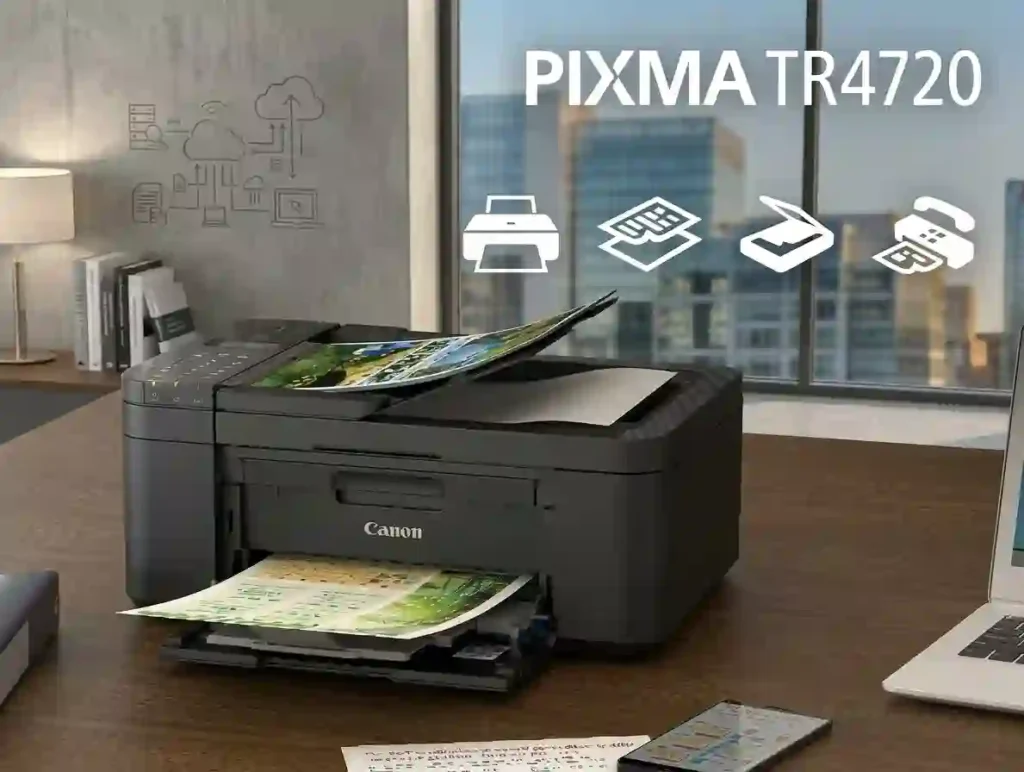
The Canon PIXMA TR4720 is a wireless all-in-one inkjet printer. One box gives you a printer, scanner, copier, and fax machine. Canon aims it at homes and light home offices.
Typical jobs include school assignments, tax forms, shipping labels, and the occasional 4 x 6 photo. Students will like it, and our list of the best inkjet printer for students shows how it compares.
An all-in-one differs from a dedicated document printer, which only prints. It also differs from a photo printer, which is tuned for color accuracy. See all-in-one printers vs printer-only models for the trade-off.
Key Features of the Canon PIXMA TR4720
Here is what Canon’s spec sheet lists:
- Four functions: print, copy, scan, and fax.
- Automatic document feeder (ADF): holds 20 letter-size or 5 legal-size sheets.
- Auto two-sided printing: works on letter-size plain paper.
- Connectivity: Wi-Fi (2.4 GHz), Hi-Speed USB, and Wireless Direct.
- Mobile printing: Apple AirPrint, Mopria, and the Canon PRINT Inkjet/SELPHY app.
- Front tray: holds 100 sheets of plain paper.
If you mostly print from a phone, see how to print from a phone at home.
Who Should Buy the Canon PIXMA TR4720?
This printer suits students, families, and occasional printers. It also works for remote workers who scan contracts and copy IDs more than they print. Check how much printing a home printer should handle to see if your volume fits.
Look elsewhere if you run a busy office. A high-volume office printer will cope better. Pro photographers should check the best photo printer for home use.
Canon PIXMA TR4720 Specifications at a Glance
Specs look like alphabet soup, so here is the plain version. Speed tells you how fast pages come out. Paper handling tells you how often you reload. Connectivity tells you how you reach the printer. Cartridge yield tells you how long ink lasts.
For a primer, see printer specifications explained for beginners.
One number is missing. A duty cycle is the most pages a printer should handle in a month. The Canon pages I reviewed do not list one for this model, so treat it as a light-use machine.
Canon PIXMA TR4720 Technical Specifications
Here are the main verified details from Canon USA:
- Technology: inkjet with a hybrid ink system (pigment black, dye color).
- Nozzles: 1,280 in total (320 black, 960 color).
- Paper sizes: 4 x 6, 5 x 7, 8 x 10, Letter, Legal, and U.S. #10 envelopes.
- Wi-Fi: 802.11 b/g/n on the 2.4 GHz band only. No 5 GHz.
- Windows: Windows 10, 8.1, and 7 SP1, per Canon’s list.
- Mac: macOS 10.12.6 to 10.15 on the spec sheet. Check Canon’s support page for newer versions.
- Size: 17.2 x 11.7 x 7.5 inches closed, 12.7 pounds.
Print Speed and Quality on the Canon PIXMA TR4720
Canon rates the TR4720 at 8.8 images per minute (ipm) in black and 4.4 ipm in color. Those numbers come from a standard test (ISO/IEC 24734) in default mode. Learn more in what pages per minute means on a printer.
A 4 x 6 borderless photo takes about 65 seconds, and real-world speed is a bit slower.
Resolution tops out at 4800 x 1200 dpi, meaning dots per inch. Our printer resolution explained in simple terms shows why a bigger number is not everything.
Canon PIXMA TR4720 Pros and Cons
Specs only tell part of the story. Here is how the printer works in daily use, covering setup, convenience, ink costs, and upkeep.
Advantages of the Canon PIXMA TR4720
- One device does four jobs. You skip a separate scanner or copier.
- The ADF cuts repeat work. Multipage scans need no page-by-page feeding.
- Setup is app-based. Canon says you download the app and follow the screens.
- Auto duplex saves paper. Canon says it can cut paper use by up to 50% on letter-size documents.
- Black text looks sharp. Pigment black ink is made for documents.
Disadvantages to Consider Before Buying
- Ink adds up. Cartridges cost more per page than refillable tanks. Our ink cartridge vs refillable tank comparison shows the gap.
- Color is slow. The 4.4 ipm rating is modest.
- Wi-Fi is 2.4 GHz only. That can trip up some router setups.
- The display is small. A 2-line LCD is not a touchscreen.
- Heavy users may outgrow it. See why inkjet printers use so much ink first.
For the bigger picture, read the advantages and disadvantages of inkjet printers.
Canon PIXMA TR4720 Specifications Table
Use this table as a quick reference before you compare the TR4720 with other budget all-in-ones. These are manufacturer-listed figures from Canon USA.
| Specification | Canon PIXMA TR4720 |
|---|---|
| Printer type | Wireless all-in-one inkjet |
| Functions | Print, copy, scan, fax |
| Maximum print resolution | Up to 4800 x 1200 dpi |
| Black print speed | Approx. 8.8 ipm |
| Color print speed | Approx. 4.4 ipm |
| Paper capacity | 100 sheets of plain paper |
| Automatic document feeder | 20 letter-size or 5 legal-size sheets |
| Automatic duplex printing | Yes, letter-size plain paper |
| Ink system | Two-cartridge hybrid (PG-275 and CL-276) |
| Wireless printing | Yes, 802.11 b/g/n, 2.4 GHz |
| Borderless printing | 4 x 6, 5 x 7, 8 x 10, Letter |
| Scanner | Flatbed with ADF, 600 x 1200 dpi optical |
Source: Canon USA product specifications. Print speeds are manufacturer-rated figures, not guaranteed everyday performance.
What Do These Specifications Mean for Everyday Users?
The 100-sheet tray suits routine home printing. Busy families will reload more often.
Auto duplex cuts paper use, but not ink use. Both sides still need ink. Low page counts can dry out the printhead, so see how often an inkjet printer should be used.
Canon PIXMA TR4720 Ink Cartridges and Page Yield
Ink is where a budget printer can get expensive. Check cartridge compatibility, page yield, and replacement options before you buy.
Page yield is the number of pages a cartridge should print under test conditions. Real results depend on page coverage, print settings, upkeep, and usage. A photo page uses far more ink than a text page.
Which Ink Does the Canon PIXMA TR4720 Use?
The TR4720 uses two cartridges: PG-275 pigment black and CL-276 dye-based color.
Standard Cartridges: PG-275 and CL-276
These cost less up front but run out sooner.
XL Cartridges: PG-275XL and CL-276XL
These hold more ink and usually cost less per page. Canon lists XL support for this printer.
| Cartridge | Ink type | Rated yield (approx.) | Best for |
|---|---|---|---|
| PG-275 | Pigment black | 180 pages | Light document printing |
| PG-275 XL | Pigment black | 400 pages | Regular black printing |
| CL-276 | Dye-based color | 180 pages | Occasional color |
| CL-276 XL | Dye-based color | 300 pages | Frequent color printing |
Yields are retailer-listed figures for Canon cartridges. Canon’s page yield page may differ, so verify before you buy.
Always match the cartridge number to your model. Our guide on how to check if a printer cartridge is compatible shows how.
Canon PIXMA TR4720 Ink Cost and Page Yield
Cost per page is the cartridge price divided by pages printed. As an illustration, a $30 cartridge that prints 400 pages costs 7.5 cents per page.
Canon’s store priced a PG-275XL and CL-276XL value pack at $74.99 in June 2025. Third-party XL pairs often list for about $22 to $44.
Build your own estimate with how to calculate the true cost of owning a printer. Canon also offers its PIXMA Print Plan, which bills by pages printed. Plans start from $4.49 per month, and terms apply.
Want to stretch each cartridge? Try how to reduce ink usage when printing and learn how to check printer ink levels correctly.
Genuine Canon Ink vs. Compatible Ink
Genuine cartridges give the most predictable results. Compatible and remanufactured cartridges cost less, but quality varies by seller.
Not every compatible cartridge damages a printer. Not every one performs like the original, either. Check the return policy and model number before you buy.
Our guides on original vs compatible printer cartridges and why a printer rejects new cartridges cover the risks.
Canon PIXMA TR4720 Wireless Setup Guide
Start with Canon’s official TR4720 support page for drivers and software. Wireless printing needs a working 2.4 GHz network, and your device must be on the same network.
For a general walkthrough, read how to set up a printer for the first time.
How to Set Up the Canon PIXMA TR4720 for the First Time
- Remove all packaging tape and protective film.
- Plug in the power cable and turn the printer on.
- Install the supplied ink cartridges as the on-screen guide shows.
- Load letter-size plain paper into the front tray.
- Download the Canon PRINT Inkjet/SELPHY app on your phone.
- Follow the app’s prompts to finish setup.
Wi-Fi Setup: How to Connect Canon PIXMA TR4720 to Wi-Fi
- Place the printer within a strong router signal.
- Open the Canon PRINT app and add a printer.
- Select your 2.4 GHz network and enter the password.
- Wait for the printer to confirm the connection.
- Print a test page.
Some routers merge 2.4 GHz and 5 GHz under one name. If setup fails, use the separate 2.4 GHz name. More help is in how to connect a printer to Wi-Fi.
How to Install Canon PIXMA TR4720 Drivers
- Open Canon’s support page for the TR4720.
- Pick your operating system and version.
- Download the recommended driver or setup package.
- Run the installer and add the printer if it does not appear.
- Print and scan a test page.
If the printer is missing from your list, see printer not showing on computer and how to install printer drivers correctly.
Printing From an iPhone, Android Phone, or Laptop
Canon lists the Canon PRINT app, AirPrint, and Mopria. Pick the printer, then set paper size, color mode, and copies. If the printer is not found, your device is probably on a different network.
iPhone and iPad
Open the photo or document, tap Share, then tap Print. Choose the TR4720. AirPrint needs no extra app.
Android Phones
Use Mopria Print Service or Canon Print Service. Open Print from the menu, then choose the printer.
Windows and Mac Laptops
Install Canon’s driver, then print from any app. For a wired fallback, see how to connect a printer to a laptop.
How to Scan, Copy, and Fax With the Canon PIXMA TR4720
Use the flatbed glass for single pages, books, and ID cards. Use the ADF for multipage stacks.
For copies, pick color or black and white, set the paper size, and choose a quantity. You can make up to 99 copies at once, with 25% to 400% scaling.
Faxing needs a phone line connected to the printer. Follow the official manual for line setup.
Scanning Documents to a Computer or Phone
- Place the original on the glass or in the ADF.
- Open IJ Scan Utility on your computer, or the Canon PRINT app on your phone.
- Choose document size and output format.
- Select PDF or an image file type.
- Save the file and note the folder.
How to Make Copies and Send Faxes
For copies, set the correct paper size first. Wrong size settings are a top cause of cropped copies. Use fit-to-page for odd-sized originals.
For faxing, you need a working phone line. Canon says a black page sends in about 3 seconds, and a color page in about 1 minute. Check the manual for error codes and advanced options.
Canon PIXMA TR4720 Print Quality and Paper Handling
The TR4720 uses a hybrid ink system. Pigment black ink gives crisp text. Dye-based color ink gives vivid colors on photo paper.
Paper quality, print mode, and source resolution all change sharpness. Plain paper, photo paper, greeting card stock, and envelopes work here. Borderless printing runs from 4 x 6 up to letter size. See what paper works best with inkjet printers.
How Good Is the Canon PIXMA TR4720 for Photos?
It is good for casual family photos, school projects, and occasional color prints. RTINGS testing found it gives better-looking photos than the cheaper Canon TS3720, thanks to a wider color range.
Use real photo paper and the right quality setting. For help with finishes, read glossy vs matte photo paper. Print photos often? Start with how to print professional-looking photos at home.
How to Improve Blurry or Faded Prints
- Check ink levels and confirm the right paper type is selected.
- Run the nozzle check from the printer’s maintenance tools.
- Run a cleaning cycle only if the check shows gaps.
- Align the printhead if the maintenance tool recommends it.
Too many cleaning cycles waste ink. If streaks stay, see why inkjet prints have lines and how to avoid blurry photo prints.
Does the Canon PIXMA TR4720 Support Automatic Double-Sided Printing?
Yes. Canon lists auto duplex for letter-size plain paper.
To turn it on, open the print dialog and choose two-sided printing. Paper type, size, and your app can change whether the option appears. Legal and photo paper need manual handling.
Canon PIXMA TR4720 Troubleshooting Guide
Start with simple checks, then move to software and upkeep. If a step does not help, use Canon’s official troubleshooting pages.
Canon PIXMA TR4720 Not Printing
- Check power, paper, ink levels, and any on-screen message.
- Cancel stuck print jobs and confirm the right printer is selected.
- Check the connection, then restart the printer and the computer.
If your computer shows it as unavailable, read why a printer keeps going offline.
Wi-Fi Problems: Canon PIXMA TR4720 Not Connecting
- Confirm the printer and device share the same network.
- Restart the router and the printer, then repeat setup.
- Make sure you are using the 2.4 GHz band.
- Move the printer closer to the router.
See why won’t my printer connect to Wi-Fi for deeper fixes.
Blank Pages From the Canon PIXMA TR4720
Check that the cartridges are seated and have ink. Run a nozzle check, then one cleaning cycle if lines are missing. If blank pages continue, seek service.
Dried ink is a common cause. Read why an inkjet printer dries out and why an inkjet printer prints blank pages.
Paper Jam or Offline Error on the Canon PIXMA TR4720
For jams, follow the manual’s removal steps and avoid yanking the sheet. Look for torn bits, bent sheets, and dust.
For offline errors, verify the network link and clear the print queue. Our guide on how to reconnect an offline printer walks you through it.
Scanner Not Working on the Canon PIXMA TR4720
Confirm the printer is on and connected. Check scanner permissions and the selected device. Restart the scan app and reinstall Canon’s software if needed.
A sister Canon model has its own fixes in how to fix a Canon TS3520 not responding.
Troubleshooting Quick Reference
| Problem | First action | Next step |
|---|---|---|
| Printer not printing | Check power and queue | Verify connection and driver |
| Wi-Fi connection fails | Confirm network (2.4 GHz) | Repeat wireless setup |
| Blank pages | Check ink cartridges | Run a nozzle check |
| Paper jam | Remove paper carefully | Inspect the paper path |
| Scanner not working | Check connection | Verify software and settings |
| Faded prints | Check ink and paper | Clean and align as needed |
Canon PIXMA TR4720 Price, Running Costs, and Availability
Do not judge value by sticker price alone. Recent listings from Canon USA, Best Buy, Staples, Office Depot, and Quill show prices from about $70 to $108.
Stock varies by seller and color. Canon’s U.S. store showed it in stock when I checked, while one Staples listing showed a version as out of stock. Confirm stock, condition, and warranty at checkout.
Is the Canon PIXMA TR4720 Affordable to Maintain?
Estimate your monthly ink bill with a simple formula. Multiply monthly black pages by black cost per page. Then do the same for color and add the two.
XL cartridges usually cut cost per page. A page-based plan like Canon’s PIXMA Print Plan can also help if you print steadily. A low purchase price does not guarantee low long-term cost.
Compare options in inkjet printer running costs explained and which home printer saves the most money on ink.
New, Refurbished, or Used: Which Should You Choose?
New gives you the full 1-year Canon warranty. Refurbished units can save money but vary by seller. Used units are the riskiest.
On a used unit, test the printhead, Wi-Fi, scanner, and cartridge recognition. Repairs rarely pay off at this price, as why your home printer may not be worth repairing explains.
Canon PIXMA TR4720 vs. Alternative Printers
If the TR4720 is out of stock, or you want lower running costs, you have options. Compare similar multifunction features, and verify current price and specs before you buy. For more picks, see our best affordable all-in-one printer guide.
Canon PIXMA TR4720 vs. Canon PIXMA TR4722
The TR4722 sits in the same family. Retail listings show the same PG-275 and CL-276 cartridges for both, and RTINGS tests them together as one product.
That points to near-identical hardware, but do not assume. Related model numbers can differ by region or retailer. Compare official specs, warranty, and price.
Budget HP All-in-One Printer vs. Canon PIXMA TR4720
Compare wireless setup, ADF, duplex, and mobile printing. Then compare ink costs and cost per page. Exact models matter more than brands.
Start with HP DeskJet 2955 vs Canon PIXMA TR4720. You can also see how a cheaper Canon fares in HP DeskJet 2855e vs Canon PIXMA TS4320.
EcoTank-Style Printer vs. Canon PIXMA TR4720
Refillable tank printers (like Epson EcoTank, Canon MegaTank, and HP Smart Tank) use bottles of ink instead of cartridges. They cost more up front and often less per page.
The break-even point depends on your monthly volume. Start with the best refillable inkjet printer for families or our HP Smart Tank 7302 review.
Printer Type Comparison
| Factor | Canon PIXMA TR4720 | Budget laser printer | Refillable ink-tank printer |
|---|---|---|---|
| Printing technology | Inkjet | Laser | Inkjet |
| Best fit | Mixed home-office tasks | Frequent text documents | Higher-volume color printing |
| Consumables | Ink cartridges | Toner | Refillable ink |
| Color printing | Yes | Model-dependent | Yes |
| Scanning and copying | Yes | Model-dependent | Model-dependent |
| Ongoing cost | Depends on ink use | Often low for text | Often low at higher volume |
No category is always cheaper or better. Weigh purchase price against cost per page, and check duplexing, scanning, and wireless features for the exact model. See laser printer vs inkjet for everyday documents.
Canon PIXMA TR4720 Buying Checklist
Run through this list before you click Buy:
- Confirm you need print, scan, copy, and fax.
- Check prices for PG-275, CL-276, and the XL versions.
- Confirm your operating system works with the driver.
- Make sure your router has a 2.4 GHz band.
- Check the seller’s return policy and warranty, mainly for used units.
Avoid common slip-ups with printer buying mistakes and what printer features actually matter.
Is the Canon PIXMA TR4720 Worth Buying?
Yes, for people who want compact everyday printing and occasional scanning. The ADF and duplex are real conveniences at this price.
Frequent color printers and busy offices should price out ink first. If the TR4720 is unavailable, compare similar models with lower ongoing costs. Our best home printer with cheap running costs guide can help.
Is the Canon PIXMA TR4720 a Good Printer?
Yes, for the right user. The Canon PIXMA TR4720 is a wireless all-in-one inkjet printer for home and light home-office use. It prints, scans, copies, and faxes, with an automatic document feeder and two-sided printing. Whether it suits you depends on print volume, ink costs, and stock.
How Do You Set Up a Canon PIXMA TR4720?
- Prepare the printer, install the ink cartridges, and load paper.
- Follow the wireless setup steps or use the Canon PRINT app.
- Install computer software if you need it.
- Print a test page and confirm the connection works.
What Ink Does the Canon PIXMA TR4720 Use?
The Canon PIXMA TR4720 uses PG-275 pigment black and CL-276 dye-based color cartridges. Higher-capacity PG-275XL and CL-276XL options are also compatible.
Frequently Asked Questions About the Canon PIXMA TR4720
1. Is the Canon PIXMA TR4720 a wireless printer?
Yes. It prints wirelessly from computers and mobile devices on a 2.4 GHz network. Use the Canon PRINT app to join the network. It also has a USB port for wired use.
2. What ink cartridges does the Canon PIXMA TR4720 use?
It uses PG-275 pigment black and CL-276 dye-based color cartridges. XL versions are also compatible.
3. Can the Canon PIXMA TR4720 scan and copy documents?
Yes. It has a flatbed scanner and an automatic document feeder for multipage originals. You can copy up to 99 pages at a time.
4. Does the Canon PIXMA TR4720 support automatic duplex printing?
Yes. Auto two-sided printing works on letter-size plain paper.
5. Why is my Canon PIXMA TR4720 not printing?
Common causes are connection problems, the wrong printer selected, stuck jobs, low ink, or a paper error. Blank pages often point to clogged nozzles, so run a nozzle check. Work through the basic fixes first.
6. How do I connect the Canon PIXMA TR4720 to my phone?
Use the Canon PRINT app, AirPrint, or Mopria. Make sure your phone and printer share the same network. iPhones print through AirPrint with no extra app.
7. Where can I download the Canon PIXMA TR4720 driver?
Go to Canon’s official support page, choose your operating system, and download the recommended driver or setup package.
8. Is the Canon PIXMA TR4720 good for photo printing?
It prints borderless photos from 4 x 6 up to letter size. It suits casual home photos, but pros should look at a dedicated photo printer.
9. Has Canon discontinued the Canon PIXMA TR4720?
Canon’s U.S. store listed it as in stock when I checked in October 2026, though some retailer listings showed out-of-stock versions. Availability can change, so confirm stock, condition, and warranty before buying.
10. Should you buy the Canon PIXMA TR4720 in 2026?
It is worth a look for basic home-office printing if the price and ink costs suit you. Compare its total cost with newer alternatives first.
Final Verdict: Should You Choose the Canon PIXMA TR4720?
The TR4720 earns its place for multifunction use, wireless printing, an ADF, and auto duplex at a low price. Those features save time every week.
The trade-offs are ink costs, modest color speed, and a light-duty design. Check availability too, since stock can shift.
The best choice depends on your budget, monthly page count, and color needs. New to buying a printer? Start with how to choose a printer for the first time. If the TR4720 fits, check Canon USA for current pricing and grab XL cartridges early.




