
printer just flashed a low ink warning. You open a shopping tab and see two prices for what looks like the same cartridge. One has the brand name on it. The other costs half as much.
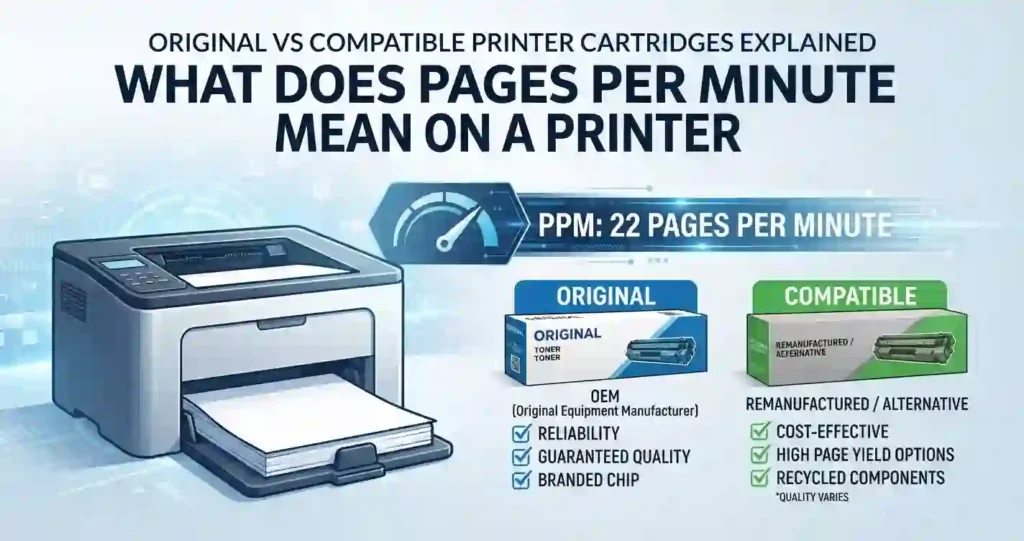
That choice is what original vs compatible printer cartridges explained really comes down to. Original (OEM) cartridges are made or branded by the printer maker, such as HP, Canon, Epson, or Brother. Compatible cartridges are built by other companies to fit specific printer models.
The type you pick affects print quality, cost per page, page yield, reliability, and printer performance. It matters for inkjet and laser printers alike. It matters for a home office and a small business too.
Quick answer: neither type wins every time. Original cartridges give the most predictable results. Compatible cartridges can cut your costs, but quality varies by seller. This guide helps you spot the difference, run the numbers, and buy with confidence. New to the basics? Start with printer ink versus toner.
What Are Original Printer Cartridges?
Original cartridges are made or branded by the printer manufacturer. You will often see them called OEM cartridges. OEM stands for original equipment manufacturer.
These cartridges are built for one printer family. The maker designs the ink or toner, the cartridge body, and the small chip that talks to the printer. Every part is tuned to work together.
Manufacturers also test their cartridges for print quality, page yield, and printer fit. That testing is a big part of what you pay for. To see what happens inside the machine, read how inkjet printers work and how a laser printer works.
Key Benefits of Original Cartridges
- Steady quality. Color accuracy, text sharpness, and print quality stay consistent from one cartridge to the next.
- Made for your printer. The cartridge matches your printer’s firmware, its cartridge recognition system, and its printhead. Our guide to the inkjet printhead shows why that fit matters.
- Support you can count on. You get manufacturer support, clearer warranty paths, and page yields you can plan around.
What Are Compatible Printer Cartridges?
Compatible cartridges are third-party products. A company other than the printer maker builds them to work in specific printer models. They are made from new parts.
Do not confuse them with two close cousins:
- Remanufactured cartridges are used OEM cartridges that were cleaned, repaired, and refilled.
- Refilled cartridges are used cartridges that someone topped up with ink or toner, often with little other work.
- Compatible cartridges are new builds, not recycled shells.
Quality depends on the details. Replacement chips, toner formulas, ink quality, and cartridge construction all vary. A well-made compatible cartridge can work well. A poorly made one can leak, streak, or fail to register.
Why Do People Choose Compatible Cartridges?
Price is the main reason. The upfront cost is lower, and the cost per page can be lower too. Curious why brand-name ink is so pricey? See why printer ink costs so much.
Compatible options also suit people who print lots of plain documents. They exist for many popular inkjet and laser models. You can find them at US sellers such as Amazon, Staples, and Office Depot.
Original vs Compatible Printer Cartridges: Key Differences
When choosing between cartridge types, price is only one factor. Page yield, print quality, printer compatibility, reliability, and long-term operating cost can make a cheaper cartridge more or less economical.
Original vs Compatible Cartridge Comparison
Use this table as a quick summary. Details for each row follow below.
| Feature | Original/OEM Cartridges | Compatible Cartridges |
|---|---|---|
| Manufacturer | Printer brand | Third-party manufacturer |
| Upfront Cost | Usually higher | Usually lower |
| Print Quality | Consistent and predictable | Varies by brand |
| Page Yield | Manufacturer-rated | Varies by cartridge |
| Printer Compatibility | Designed specifically for printer | Designed for listed models |
| Color Accuracy | Generally consistent | Can vary |
| Reliability | Typically predictable | Depends on manufacturer |
| Warranty/Support | Manufacturer support | Third-party support |
| Cost Per Page | Usually higher | Often lower |
| Availability | Widely available | Varies by printer model |
For a wider view of ownership costs, see the true cost of owning a printer.
Print Quality and Color Accuracy
Print quality covers text sharpness, grayscale output, photo quality, color consistency, and fine detail. Cartridge type is one piece. Paper, printer settings, and resolution matter too.
Resolution is measured in DPI, or dots per inch. More dots per inch means finer detail. Our page on printer resolution explains the numbers in plain terms.
Text and Grayscale Output
For everyday letter-size documents, the gap can be small. Good compatible ink or toner often produces clean black text. Differences tend to show up in deep blacks, thin lines, and smooth gray tones.
Paper plays a role as well. Check what paper works best with inkjet printers before blaming the cartridge.
Photos and Fine Detail
Photos expose differences faster than text does. Gradients, skin tones, and shadows need precise ink formulas and color profiles. A slight color shift is easy to see in a family portrait.
That is why photo fans often stay with original ink. We cover the details in the photo section below.
Page Yield and Cost Per Page
Page yield is the number of pages a cartridge can print before it runs out. It lets you compare cartridges fairly. A higher yield spreads the price over more pages.
To find cost per page, divide the cartridge price by its estimated page yield. Real results vary with coverage, document type, graphics, photos, and print settings. A page of dense charts uses far more ink than a page of text.
For laser users, see laser printer cost per page explained and how long laser printer toner lasts.
What ISO Yield Ratings Mean
Standardized ratings make comparisons easier. ISO/IEC 24711 covers inkjet cartridges. laser toner have ISO/IEC 19752 covers monochrome. ISO/IEC 19798 covers color laser toner.
The black-and-white test page uses about 5% coverage. The color test pages average about 20% across four colors. If you print heavier pages than that, expect fewer pages than the label says.
These tests use plain paper and measure yield only. They do not judge quality or reliability. They also do not cover photo printing.
Printer Compatibility and Cartridge Recognition
Always match the exact printer model and the cartridge number. Printer families share cartridge series, but small changes in model numbers can matter. Regional versions can differ too, so a cartridge sold overseas may not suit a US printer.
Mismatches cause error messages, poor fit, and wrong ink level readings. Check the listing twice before you click buy. Our guide on how to check printer ink levels correctly helps you read those meters with the right expectations.
How Cartridge Chips Work
Most cartridges carry a small chip. The chip tells the printer what the cartridge is, and it tracks the ink or toner level. Compatible makers either reuse an OEM chip or install a new one.
A new chip may not match what the printer expects. That can trigger a “not recognized” message or an inaccurate level display.
What Firmware Updates Can Change
Firmware is the printer’s built-in software. Some brands use it to check cartridge chips. HP, for example, has described a feature called Dynamic Security that is meant to block cartridges with non-HP chips. HP has said reused cartridges that keep an original HP chip are not affected.
Updates can change how your printer treats a cartridge that worked before. HP has faced lawsuits and regulator attention over this. Some users pause automatic updates, but updates also carry security fixes, so weigh both sides.
Are Compatible Cartridges Safe for Your Printer?
A well-made compatible cartridge is designed for a specific printer model. The catch is that quality varies between suppliers. Two cartridges with the same listed model can perform very differently.
Possible issues include leaks, weak print quality, wrong cartridge recognition, and uneven output. Many of these show up in the first few days. That is why return policies matter.
Buying from an established seller with a clear return policy lowers your risk. If something fails, you can swap it fast. For help with odd prints, see why inkjet prints have lines.
Can Compatible Cartridges Damage a Printer?
Normal use of a good third-party cartridge is one thing. A defective or poorly built cartridge is another. Problems tend to come from the build quality, not from the idea of third-party supply itself.
Possible risks include:
- Leaking ink that gums up internal parts
- Toner contamination inside a laser unit
- Clogged printheads
- Poor cartridge fit
Not every compatible cartridge will harm a printer. Not every original cartridge will protect one either. Quality and printer technology both matter. Dried-out nozzles are a common culprit, so read why an inkjet printer dries out before you blame a cartridge.
Original vs Compatible Cartridges: Pros and Cons
Here is the trade-off in plain terms. Original cartridges buy you predictability. Compatible cartridges buy you savings. Which matters more depends on what you print.
For a printer-level view, see the inkjet printer advantages and disadvantages.
Advantages of Original Cartridges
- Consistent print quality and color reproduction
- Strong printer compatibility and predictable cartridge recognition
- Manufacturer-backed specifications and support
Disadvantages of Original Cartridges
- Higher purchase price
- Potentially higher cost per printed page
- Less appealing for high-volume everyday document printing
Advantages of Compatible Cartridges
- Lower upfront purchase price
- Potentially significant savings for frequent printing
- Multiple third-party brands and cartridge options
Disadvantages of Compatible Cartridges
- Quality can vary significantly between manufacturers
- Possible cartridge recognition or firmware-related issues
- Color consistency and actual page yield may differ from expectations
Original vs Compatible Ink Cartridges for Photo Printing
Photo printing asks more of your ink. It demands accurate color, rich ink density, smooth gradients, and the right paper. A small shift that no one notices in a memo can ruin a sunset.
Graphics and color-heavy documents sit in the middle. Charts and brochures look fine with many inks. Professional-looking photos need tighter control.
Three things help any cartridge look its best:
- The correct photo paper
- The right print quality mode
- Proper printer color settings
Learn more in how to print professional-looking photos at home and glossy vs matte photo paper.
Which Cartridge Type Is Better for Photos?
Do not decide on cartridge type alone. Compare color consistency, ink formulation, printer profile support, and photo paper compatibility. A strong match of all four beats a label.
Casual photo printers have different needs than professional photographers. Holiday cards and school pictures can look great with a good compatible cartridge. Prints you will frame or sell deserve the most predictable ink you can get.
If colors look off, check why printer colors do not match the screen and color calibration for printers first. Those fixes cost nothing.
Original vs Compatible Toner Cartridges for Laser Printers
Laser printers shine with text-heavy work. Think reports, invoices, and everyday office printing. Both OEM and compatible toner can do this job well.
What to compare:
- Toner consistency: even powder gives even blacks.
- Page coverage: how much of the page gets toner.
- Print density: how dark and solid the print looks.
- Fine text: small fonts should stay crisp.
Know your parts. The toner cartridge holds the powder. The drum unit carries the image before it transfers to paper. Some printers use an all-in-one cartridge that combines both. Our guide to the drum unit and toner cartridge explains the split.
Laser trouble signs are easy to spot. See faded laser prints and black marks on laser prints. For photos, read whether laser printers print photos well.
Compatible Toner for High-Volume Printing
Heavy printers feel price differences fastest. Compare the cartridge price against its rated page yield and your estimated cost per page. Then think about how often you will swap cartridges.
Replacement frequency adds hidden costs. Each swap takes time, and a bad cartridge can mean reprints. Total operating costs matter more than the sticker price.
Do not choose on price alone. Judge toner quality and supplier reliability too. A supplier with clear specs and a fair return policy is worth a few extra cents.
Need ideas for choosing the right machine? Read how to choose a laser printer with low running costs.
Duty Cycle Explained
Duty cycle is the maximum number of pages a printer is built to handle in one month. It is a stress limit, not a target. Pushing past it can wear parts faster.
Cartridge yield is different. Yield tells you how long a cartridge lasts. Duty cycle tells you how hard the printer can work. See how many pages a laser printer can print.
How to Calculate the Real Cost of Printer Cartridges
Cartridge price alone can fool you. Cost per page (CPP) is a better yardstick. It shows what each printed page really costs.
Formula: Cartridge Cost ÷ Estimated Page Yield = Cost Per Page.
Include these details in your math:
- Cartridge capacity
- Page coverage
- Color versus black printing
- Replacement frequency
Black-only pages cost less than color pages. Color cartridges often drain faster because several inks share the job. For deeper math, see inkjet printer running costs explained and how refillable tank printers change the numbers.
Example Cost Comparison
A $40 cartridge rated for 500 pages costs about 8 cents per page. A $20 compatible cartridge rated for 400 pages costs about 5 cents per page. These figures are examples, not quotes.
Real yields can fall short of the label. This table shows what happens when they do.
| Scenario | Price | Rated Yield | Actual Yield | Cost Per Page |
|---|---|---|---|---|
| Original cartridge | $40 | 500 pages | 500 pages | 8.0 cents |
| Compatible, meets rating | $20 | 400 pages | 400 pages | 5.0 cents |
| Compatible, falls short | $20 | 400 pages | 300 pages | 6.7 cents |
| Compatible, poor quality | $20 | 400 pages | 150 pages | 13.3 cents |
At 3,000 pages a year, 8 cents costs $240. Five cents costs $150. That is a $90 gap, unless yields drop.
Advertised yields and real yields can differ because of coverage and print settings. A cheap cartridge that underdelivers can cost more than an OEM one. Track your own results to know for sure.
How to Choose Between Original and Compatible Cartridges
Follow these steps for a smart pick:
- Estimate your print volume. Count pages per month.
- Note your printer’s age. Older printers are often safer from chip blocks.
- Define your quality bar. Text, graphics, or photos?
- Set a budget. Include cartridges, paper, and your time.
- Compare cost per page. Use rated yield, cartridge capacity, and seller reputation.
- Verify the model and cartridge number. Do this before you pay.
Not sure about your volume? Use our guide on how to choose a printer for your monthly print volume. If low cost is the goal, see the best home printer with cheap running costs.
Choose Original Cartridges If You:
- Prioritize consistent color and predictable print quality
- Frequently print important business documents or high-quality photos
- Prefer manufacturer support and straightforward compatibility
Consider Compatible Cartridges If You:
- Want to reduce ongoing printing costs
- Mostly print everyday documents and text-heavy materials
- Can verify cartridge compatibility, reviews, warranty, and return policies
Your printer choice shapes ink costs too. See which home printer saves the most money on ink.
How to Buy Compatible Printer Cartridges Safely
Follow this simple routine:
- Verify the exact printer model and cartridge number.
- Check seller reviews, product specs, warranty coverage, and return policies.
- Look for clear page yields and cartridge capacity, not vague claims.
- Confirm the type. Is it new compatible, remanufactured, or refilled?
- Keep your receipt and packaging for returns.
On marketplaces such as Amazon, check who the seller is and what the return window says. At office stores such as Staples and Office Depot, you can often return items in person. Policies change, so read the current terms.
Running a small shop? See how to cut small business printer expenses without risking downtime.
Red Flags to Watch For
- Extremely low prices without clear specifications
- Missing compatibility information or unclear cartridge model numbers
- No return policy, warranty, manufacturer information, or seller support
Common Problems With Compatible Printer Cartridges
Most issues are easy to spot. Here are the usual suspects:
- Cartridge-not-recognized errors from chip compatibility or printer firmware
- Poor print quality such as streaking, fading, smearing, or wrong colors
- Low page yield, leakage, or uneven cartridge performance
Blank or streaky pages are not always the cartridge. Read why an inkjet printer prints blank pages and common inkjet printer problems and their causes. Laser users can check common laser printer problems.
How to Troubleshoot a Compatible Cartridge
Try these steps in order:
- Power off the printer and remove the cartridge.
- Remove protective seals, tape, or packaging. Missing this step is a classic mistake.
- Reinstall the cartridge until it clicks into place.
- Run the cleaning, alignment, or calibration tools when they apply.
- Check firmware and compatibility before replacing a cartridge that still works.
- Contact the seller and use the return policy if the problem stays.
Level readings on compatible cartridges can be off. Do not trust the meter alone. Test with a print.
Original vs Compatible Cartridges: What About Printer Warranty?
Start with your printer maker’s warranty terms. Wording differs by brand and by model. Our page on printer warranty terms shows what to look for.
In the US, the Magnuson-Moss Warranty Act generally stops companies from tying your warranty to brand-name supplies. The exception is when the company supplies them for free. The FTC has also warned several companies about tying warranties to branded parts. Using a third-party cartridge alone should not void your warranty. This is general information, not legal advice.
There is one catch. If a defective cartridge directly causes damage, the maker may decline that specific repair. Keep purchase receipts and cartridge documentation. They help if you ever dispute a claim.
Environmental Impact of Original and Compatible Cartridges
Every cartridge has a footprint. Reuse, remanufacturing, recycling, and disposal practices all change it. Remanufactured cartridges keep shells out of landfills, while new builds use fresh materials.
Recycling programs help cut waste. Many manufacturers and US office retailers accept used cartridges. Program rules change, so check before you drop off.
Look at the whole picture:
- Packaging and shipping distance
- Cartridge lifespan and page yield
- Recycling options in your area
A cartridge that lasts longer creates less waste per page. Electricity matters too. See home printer electricity usage costs.
Original vs Compatible Printer Cartridges: Quick Buying Checklist
For a quick decision, check these factors before adding a cartridge to your cart:
- Printer compatibility: Verify the exact printer and cartridge model.
- Cost per page: Compare price against rated page yield.
- Print quality: Consider whether you primarily print text, graphics, or photos.
- Reliability: Review seller reputation, warranty, and return policy.
- Cartridge type: Check whether it is OEM, compatible, remanufactured, or refilled.
Storing a spare? Learn how long unopened ink cartridges last.
Frequently Asked Questions
Are compatible printer cartridges as good as original cartridges?
It depends on the maker. Some compatible cartridges print very close to originals for everyday documents. Others show weaker color, shorter life, or more errors. Compare print quality, reliability, page yield, and intended use before you decide.
Is it better to buy original or compatible ink cartridges?
Neither is always better. Your print volume, budget, quality needs, and tolerance for risk decide it. Heavy document printers often lean compatible. Photo printers often lean original.
Do compatible cartridges damage printers?
A defective or poorly built cartridge can leak or clog a printhead. That is a quality problem, not a rule for all third-party cartridges. Buy from sellers with clear return policies to lower the risk.
Do compatible cartridges have the same page yield?
Not always. Yield depends on cartridge capacity, ink or toner formula, and standardized testing. Real yield also changes with coverage and use. A cartridge that prints fewer pages than rated can erase your savings.
Why is my printer not recognizing a compatible cartridge?
Common causes are chip mismatch, poor installation, a firmware update, or the wrong model number. Try this: remove the cartridge, take off any seals, reseat it, and restart the printer. If it still fails, confirm the cartridge number and contact the seller.
Do compatible cartridges affect print quality?
They can. Ink or toner formulas and build quality differ by maker. Paper, print settings, and printer condition also change results. Run a cleaning cycle and test on good paper before judging the cartridge.
Are compatible cartridges worth buying for home printers?
They can be, if you print enough pages to notice the savings. Light users may save little in a year. Heavy document users often save more. Our guide on reducing home printing costs covers other ways to cut spending.
Can I use compatible cartridges for photo printing?
Yes, but results vary. Color accuracy, ink formula, photo paper, and printer settings all matter. People who want gallery-quality prints often stick with original ink. Casual photo printers may be happy with a good compatible option.
What is the difference between compatible and remanufactured cartridges?
Remanufactured cartridges reuse parts from previously used cartridges. Compatible cartridges are new third-party builds made for specific printers. Both are third-party options, but their parts and quality control can differ.
How can I get the lowest cost per printed page?
Compare cartridge price, page yield, capacity, and your print volume. Black-and-white printing usually costs less than color. See cheap printer vs low-cost printing to learn why the cheapest printer is rarely the cheapest to run.
Conclusion: Original vs Compatible Printer Cartridges
Original and compatible cartridges differ in price, print quality, page yield, reliability, compatibility, and support. Original cartridges offer predictable results and clear support. Compatible cartridges can lower your costs, but quality depends on the supplier.
The right choice depends on your printer model and your printing needs. Heavy document printers may save the most with a trusted compatible brand. Photo fans and important business work may call for original ink.
Do not choose on sticker price alone. Compare cost per page and confirm compatibility before you buy. Do the math once, and every future refill gets easier.




